001 - Networking is Everywhere
When I first heard the word Networking, I immediately thought about people. Porter Gale's famous book reminds us that the relationships we build can become one of our greatest assets. That's what "network" meant to me for a long time.
"Your network is your net worth." — Porter Gale
So when I started learning cybersecurity, I was surprised that one of the very first topics was Networking.
At first, I wondered:
Why do I need to learn networking before learning how to hack or defend systems?
After today's lesson, I think I'm beginning to understand why.
Cybersecurity isn't just about attacking or protecting computers, it's about protecting how those computers communicate. And before I can secure that communication, I first need to understand how they communicate with each other.
That journey begins with one simple question:
What is a network?
Network
A network is simply a group of devices connected together so they can communicate and share information. That definition sounded almost too simple. But the more I looked around me, the more I realized that networks are everywhere.
As I'm writing this, my laptop is connected to my Wi-Fi. My phone is connected to the same router. My router connects both devices, and together they form a network.
Without realizing it, I'm surrounded by networks every single day.
- The computers inside my university (TUP-Manila)
- The ATMs I use
- The LRT and MRT systems here in the Philippines
- Banks processing transactions
- Even the phone in my pocket
They're all connected through some kind of network. Now I realize networks are quietly running behind almost every piece of technology we use in our daily lives.
The Internet
I always imagined the Internet as one giant thing but I learned that the Internet is actually a network of networks.
Every home Wi-Fi, every school, every company, and every organization has its own network. The Internet simply connects all of those smaller networks together.
Instead of imagining one massive computer somewhere in the world, I can now picture millions of smaller networks talking to one another.
Now, if billions of devices are connected together, how does my laptop know where another computer is?
That's when I was introduced to the two main identifier of a network: an IP Address and MAC Address.
First Identity of a Computer: IP Addresses
From what I understand so far, an Internet Protocol (IP) Address is like the address of a device on a network. If devices want to send information to one another, they first need to know where that information should go.
That's the role of an IP address.
One thing I found interesting is that an IP address isn't necessarily permanent. A device can use one IP address today and receive another one later depending on the network it's connected to which I think is another lesson in the future.
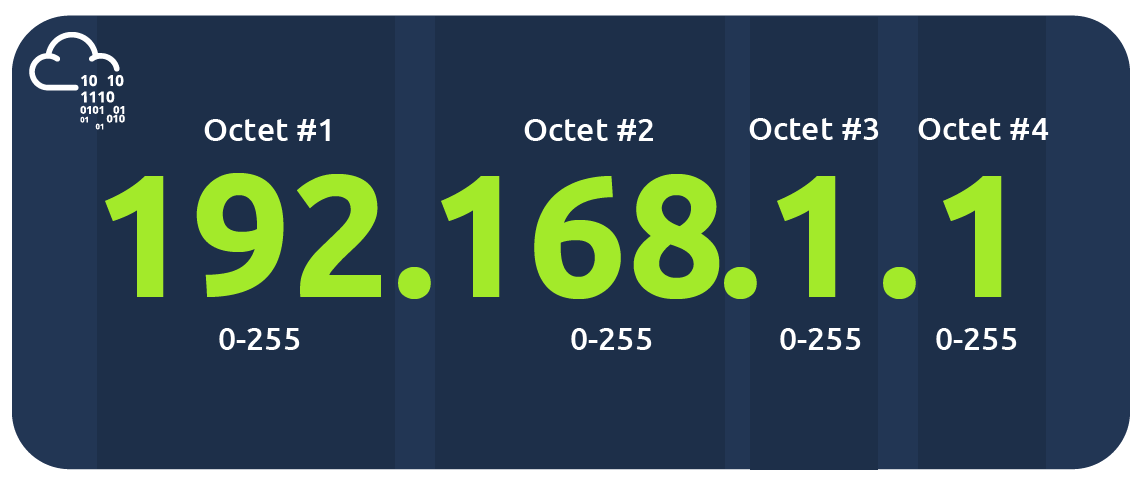
For now, here's the IPv4 structure that I encountered in today's lesson:
I also learned that these four groups of numbers are called octets. I don't fully understand how they're calculated yet but that's something I'll explore later when I study IP Addressing & Subnetting.
For now, I'm just trying to understand the bigger picture before diving into the details.
Private IP Address vs. Public IP Address
One part that confused me was seeing the same computer appear to have two different IP addresses. After reading more carefully, I realized they're actually used for different purposes.
Private IP Address
This is used for communication inside a local network like my home Wi-Fi.
Public IP Address
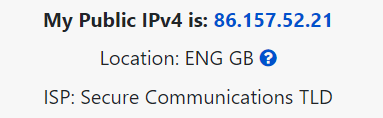
This is the address that represents my network on the Internet.
| Device Name | IP Address | IP Address Type |
|---|---|---|
| DESKTOP-KJE57FD | 192.168.1.77 | Private |
| DESKTOP-KJE57FD | 86.157.52.21 | Public |
| CMNatic-PC | 192.168.1.74 | Private |
| CMNatic-PC | 86.157.52.21 | Public |
Both computers have different private IP addresses, but they share the same public IP address because they're connected to the same Internet connection through the same router.
IPv4 and IPv6
Now, if every device in the world needs an IP address, what will happen when we run out of combinations?
Apparently, that's exactly what happened with IPv4.
With billions of phones, laptops, smart TVs, sensors, and IoT devices connecting to the Internet, the available IPv4 addresses are no longer enough for the future. By the end of 2021, Cisco estimated that 50 billion devices are connected to the Internet (Cisco., 2021).
That's one of the reasons IPv6 was introduced yet I'm not planning to memorize IPv6 addresses for now.
Today's goal wasn't memorization but simply understanding why IPv6 exists. It extend the existing IPv4 with a new type of combinations as we can see in the picture below:
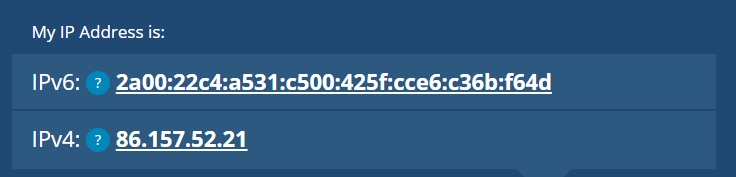
IPv6 can support up to 2^128 of IP addresses (340 trillion-plus), resolving the issues faced with IPv4 and it's more efficient due to new methodologies
Second Identity of a Computer: MAC Addresses
Just when I thought every device only needed an IP address, I came across another identifier: the MAC Address. At first, I honestly thought it was just another type of IP address.
It isn't.
The way I understand it now is this:
- An IP address tells you where a device is on a network.
- A MAC address identifies the physical network hardware itself.
Every network interface card receives a unique MAC address from its manufacturer.
One thing I found fascinating is that MAC addresses can actually be spoofed (MAC Spoofing), allowing one device to pretend to be another.
That immediately made me wonder how attackers might abuse this in real-world environments and I'm looking forward to learn more about that when I get deeper into network security.
Ping
Today's lesson also introduced me to one of the simplest networking tools: ping.
Instead of just reading about it, we can actually open our computer's terminal and try it:
ping google.com
I'm not sure if its safe to put here what displayed on my terminal but as you also tried it, we can see our computer send packets and receive replies which made networking feels much more real, right?
Running a simple command helped me realize that these concepts are actually happening every second while I'm connected to the Internet.
Conclusion
If I had to describe today's lesson in one sentence, it would be this:
Networking isn't just really about cables because it's also about communication.
Every device needs an identity. Every message needs a destination. Every connection follows standard rules. I still have a lot to learn, but I also feel like I now have a stronger foundation for everything that comes next in cybersecurity.
Next Rabbit Hole
Our next stop is 002 - Every Network Has a Design.
See you in the next learning blog. 👋
Reference