008 - What Really Happens When You Visit a Website
So far, I've learned how devices communicate on a network using things like DNS, ARP, and DHCP. But one question still remained:
What actually happens after I type https://google.com into my browser and press Enter?
This lesson answered that question.
I learned about HTTP, the protocol that allows browsers and web servers to communicate. I also learned what a URL really contains, how browsers make requests, and how servers respond with the pages we see every day.
What is HTTP?
HTTP (HyperText Transfer Protocol) is the language that web browsers and web servers use to communicate.
Whenever I visit a website, watch a video, load an image, or open a webpage, my browser is using HTTP behind the scenes. It defines the rules for requesting resources and receiving responses.
Without HTTP, browsers wouldn't know how to ask for webpages, and servers wouldn't know how to deliver them.
Then Why Do Most Websites Use HTTPS?
HTTPS is simply the secure version of HTTP.
Instead of sending data in plain text, HTTPS encrypts everything being transmitted between my browser and the website. That means someone listening on the network can't easily read passwords, messages, or other sensitive information.
HTTPS also helps verify that I'm actually talking to the real website instead of someone pretending to be it.
Every Website Visit Starts With a URL
Before my browser can ask for anything, it first needs to know where to send the request.
That's exactly what a URL (Uniform Resource Locator) is for.
A URL tells the browser:
- what protocol to use
- which server to contact
- which resource to request
For example:
https://tryhackme.com/room/introtoweb
looks simple, but it's actually made up of several parts.
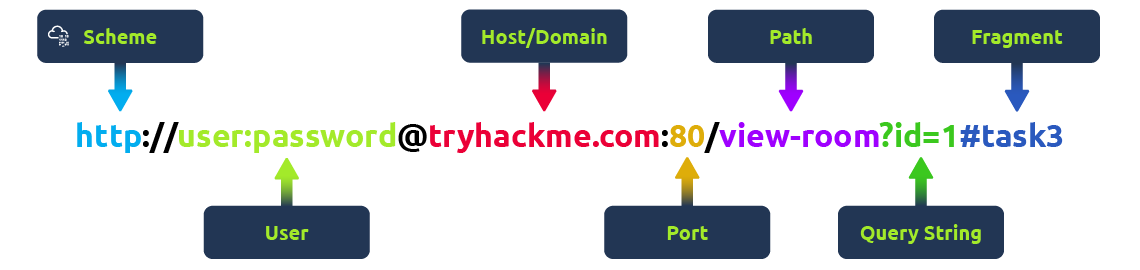
Breaking Down a URL
A URL contains multiple pieces of information.
- Scheme tells the browser which protocol to use, such as HTTP or HTTPS.
- Host is the website or server you're trying to reach.
- Port tells the browser which network port to connect to. HTTP usually uses 80, while HTTPS uses 443.
- Path identifies the exact page or resource being requested.
- Query String sends extra information to the server.
- Fragment jumps to a specific section of a webpage after it has loaded.
I used to think a URL was just a website address, but it's really a complete set of instructions telling my browser exactly where to go.
Making an HTTP Request
Once the browser understands the URL, it sends an HTTP Request to the web server.
Think of it like placing an order at a restaurant.
The browser tells the server:
"Here's the website I want, and here's some information about me."
A very simple HTTP request looks like this:
GET / HTTP/1.1
Host: tryhackme.com
User-Agent: Mozilla/5.0 Firefox/87.0
Referer: https://tryhackme.com/
Although this looks small, there's actually a lot happening.
The GET method tells the server that I'm requesting data.
The / means I'm asking for the homepage.
The Host header tells the server which website I want.
The User-Agent header tell the web server we are using the Firefox version 87 Browser
The Referer header tells the web server that the web page that referred us to this one is https://tryhackme.com
Finally, every HTTP request ends with a blank line to signal that the request is complete.
Example Response:
HTTP/1.1 200 OK

Server: nginx/1.15.8
Date: Fri, 09 Apr 2021 13:34:03 GMT
Content-Type: text/html
Content-Length: 98


<html>
<head>
    <title>TryHackMe</title>
</head>
<body>
    Welcome To TryHackMe.com
</body>
</html>
To breakdown each line of the response:
Line 1: HTTP 1.1 is the version of the HTTP protocol the server is using and then followed by the HTTP Status Code in this case "200 OK" which tells us the request has completed successfully.
Line 2: This tells us the web server software and version number.
Line 3: The current date, time and timezone of the web server.
Line 4: The Content-Type header tells the client what sort of information is going to be sent, such as HTML, images, videos, pdf, XML.
Line 5: Content-Length tells the client how long the response is, this way we can confirm no data is missing.
Line 6: HTTP response contains a blank line to confirm the end of the HTTP response.
Lines 7-14: The information that has been requested, in this instance the homepage.
The Server Sends an HTTP Response
After receiving the request, the server processes it and sends back an HTTP Response.
This response usually contains:
- a status code
- response headers
- the actual webpage
For example:
HTTP/1.1 200 OK

Content-Type: text/html
Content-Length: 98

<html>
...
</html>
The first line immediately tells me whether my request succeeded.
Everything below it contains additional information about the response before finally sending the webpage itself.
Why This Matters
Before learning this, I thought opening a website was just my browser magically loading a page.
Now I understand it's actually a conversation.
- I type a URL.
- My browser reads the URL.
- It creates an HTTP request.
- The server receives it.
- The server sends back an HTTP response.
- My browser renders the webpage.
Every website visit follows this same process in just a fraction of a second.
Conclusion
HTTP is one of the most fundamental protocols on the internet. It defines how browsers and servers communicate every time we open a webpage.
Understanding URLs, requests, and responses helped me realize that browsing the web isn't magic as it's simply a structured conversation happening between two computers.
Next Rabbit Hole
Now that I know how browsers and servers communicate, I want to understand what kind of actions a browser can ask a server to perform.
That's where HTTP Methods like GET, POST, PUT, and DELETE come in. They define the intent behind every request and are used in almost every web application.
See you in the next learning journal. 👋
Reference
- TryHackMe — HTTP in Detail