003 - The Devices That Keep Networks Running
In the previous learning journal, I learned that there are different ways to design a network through different LAN Topologies. One thing I noticed while looking at those diagrams was that almost every topology had a device in the middle connecting everything together.
What exactly are those devices doing?
Today's lesson introduced me to two of the most important networking devices: the Switch and the Router. At first, I honestly thought they did the same job. It turns out they have completely different responsibilities.
What is a Switch?
From what I've learned so far, a Switch is responsible for connecting multiple devices within the same network. These devices can be computers, printers, servers, or anything that supports an Ethernet connection.
Switches are commonly found in places where many devices need to communicate with each other, such as schools, offices, and businesses. Depending on the model, they can have different numbers of ports like 4, 8, 16, 24, 32, or even 64 ports.
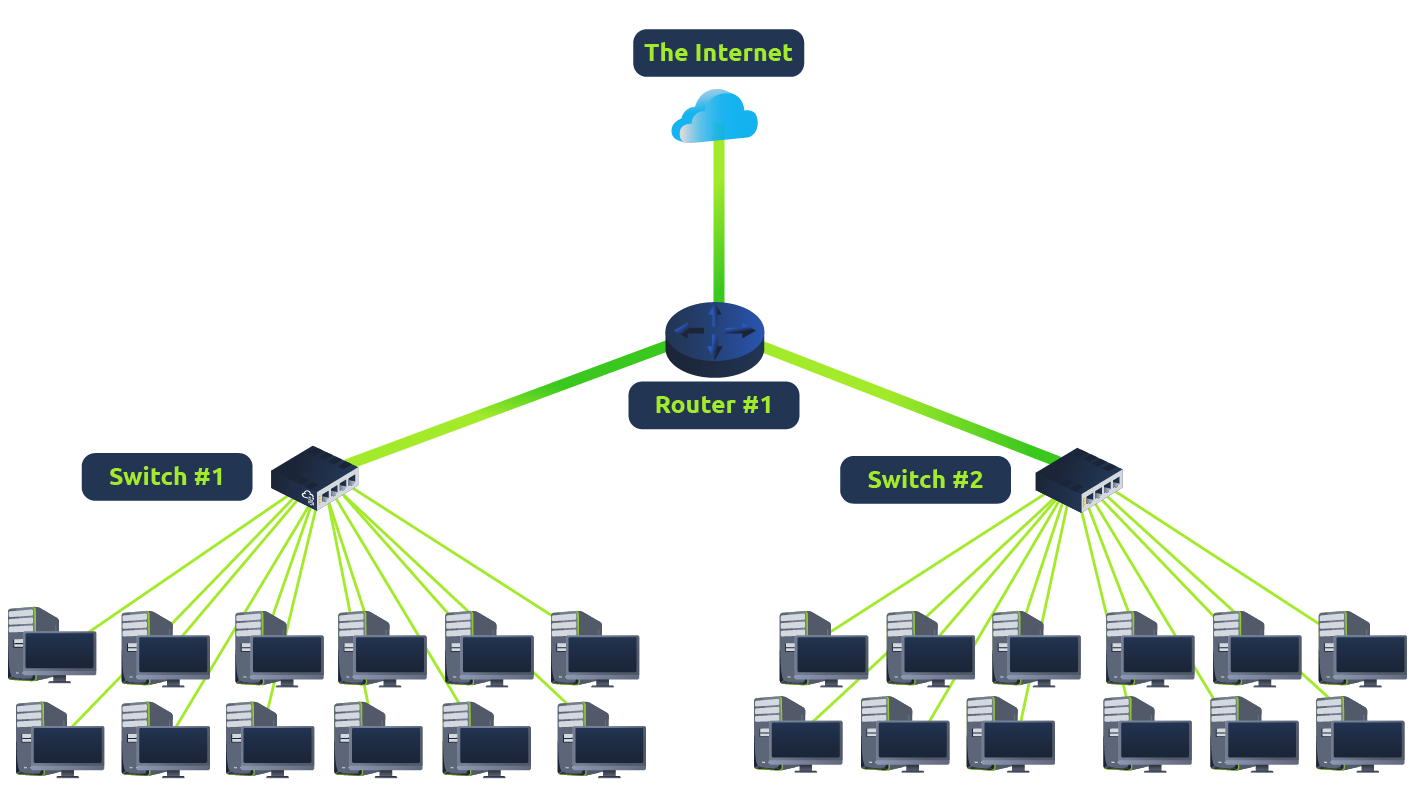
Something I found interesting is that a switch doesn't simply send data everywhere.
Instead, it keeps track of which device is connected to which port. So when it receives a Packet, it already knows where that packet should go and forwards it only to the intended device.
That makes a switch much more efficient because it reduces unnecessary traffic inside the network.
Why Not Just Use a Hub?
While learning about switches, I also came across another networking device called a Hub.
Unlike a switch, a hub doesn't know which device is connected to which port. Whenever it receives data, it simply copies that data and sends it to every connected device.
Eventually the correct device receives the packet, but so does every other device connected to the hub.
I think that's what helped me understand why switches became the standard. Instead of broadcasting everything, they send data only where it needs to go, making communication much faster and more efficient.
What is a Router?
Once I understood the role of a switch, another question came to mind.
If a switch connects devices inside the same network, what connects one network to another?
That's where the Router comes in.
A router's job is to connect different networks and move data between them. Instead of focusing on individual devices, it focuses on helping entire networks communicate with each other.
For example, all the devices connected to my home Wi-Fi belong to the same local network. But when I visit Google or watch YouTube, my data has to leave my home network and travel across the Internet.
That's the router's responsibility.
What is Routing?
The process a router uses to move data between different networks is called Routing.
From what I understand, routing is simply deciding which path a packet should take to reach its destination.
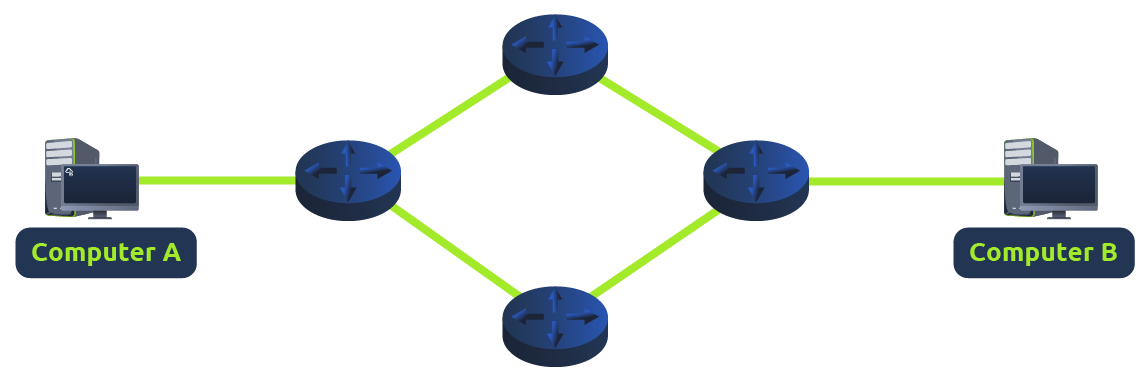
I like thinking of it like using Google Maps.
There are usually several possible roads that can take me to the same destination. Google Maps chooses one depending on the available routes.
A router does something similar, except instead of guiding cars, it's guiding packets across different networks until they reach where they're supposed to go.
Conclusion
Before today's lesson, I honestly thought a router was just the device that gave me Wi-Fi.
Now I understand that a Switch and a Router solve two different problems.
A switch helps devices communicate within the same network, while a router helps different networks communicate with each other.
The more I learn about networking, the more I realize that every device has a specific role. Together, they make it possible for billions of devices around the world to stay connected.
Next Rabbit Hole
Now that I know how devices are connected and how different networks communicate with each other, another question comes to mind.
If a company has thousands of devices, do they all belong to one giant network?
Apparently not.
The next concept I'll be exploring is 004 - How to Split Large Networks, where I'll learn how large networks are divided into smaller ones.
Reference: