006 - How Do Devices Get an IP Address
In the previous journal, I learned that devices use ARP to translate an IP Address into a MAC Address before they can communicate with each other.
But after learning about DHCP, another question came to my mind:
If every device needs an IP address before ARP can even work, who assigns those IP addresses in the first place?
At first, I assumed someone had to manually configure every computer connected to a network. That sounded manageable if there were only two or three devices.
But imagine doing that for an entire school, an office building, or even a shopping mall with hundreds or thousands of connected devices.
There had to be a better way. That's where I discovered DHCP.
Meet DHCP
DHCP, short for Dynamic Host Configuration Protocol, is responsible for automatically assigning IP addresses to devices when they join a network.
Without DHCP, someone would have to manually configure every device one by one.
That might work for a small lab, but it would quickly become impractical in larger environments where devices are constantly joining and leaving the network.
The more I thought about it, the more I realized that we have probably been using DHCP for years without ever knowing it existed because every time we connect our phones to a new Wi-Fi network and it starts working within seconds, DHCP is quietly doing its job behind the scenes.
How Does a Device Get an IP Address?
One thing I found interesting is that a device doesn't simply receive an IP address out of nowhere.
Instead, there's actually a conversation happening between the device and the DHCP server.
It follows four simple steps.
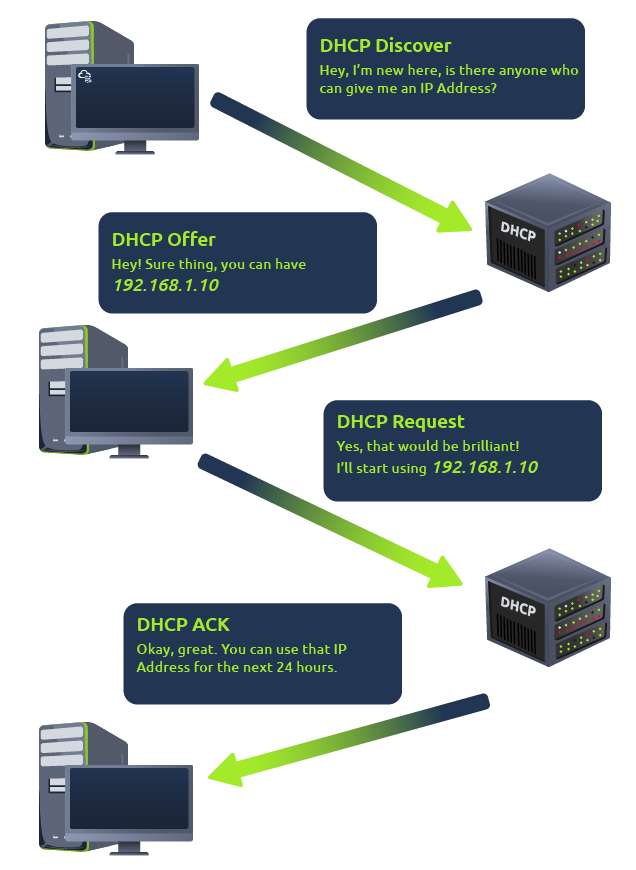
1. DHCP Discover
When a device first joins a network, it doesn't have an IP address yet.
So the first thing it does is broadcast a message asking:
"Is there a DHCP server on this network?"
This message is called a DHCP Discover.
2. DHCP Offer
If there's a DHCP server available, it replies with an available IP address that the device can use.
This response is called a DHCP Offer.
At this point, the server is basically saying,
"You can use this IP address if you'd like."
3. DHCP Request
The device then responds by accepting that offer.
This step is called a DHCP Request.
It's simply the device confirming that it wants to use the offered IP address.
4. DHCP ACK
Finally, the DHCP server sends back an acknowledgment confirming that everything is complete.
This last message is called DHCP ACK.
Once this exchange finishes, the device officially has its own IP address and can start communicating with the rest of the network.
Let's take a look in the diagram below to fully understand the process of DHCP:
Conclusion
I thought connecting to Wi-Fi was almost instantaneous. Now I know there's actually a short conversation happening every time a device joins a network.
The device asks for an IP address.
The DHCP server offers one.
The device accepts it.
The server confirms it.
All of that usually happens in just a few seconds, which is why most of us never notice it.
It's another example of how much work happens behind the scenes whenever we connect to the Internet.
Next Rabbit Hole
Now that devices can automatically receive an IP address, another question popped into my head.
I know computers communicate using IP addresses, but I never type IP addresses into my browser. I type names like google.com instead. So how does my computer know which IP address belongs to a website?
Looks like the next piece of the puzzle is about DNS.
Reference