007 - Why Don't We Memorize IP Addresses
In the previous journal, we learned how devices automatically receive an IP Address through DHCP so every device on the Internet has its own unique IP address.
But after learning about DNS, I realized now why I've never typed an IP address into my browser whenever I want to visit a website like:
google.comyoutube.comgithub.comtryhackme.com
I've never memorized something like 142.250.190.78.
So if computers communicate using IP addresses, how does my computer know where google.com actually is?
That question introduced me to one of the Internet's most important services:
DNS, or the Domain Name System.
The Internet's Phonebook
We can describe DNS like the Internet's phonebook.
People are much better at remembering names than long strings of numbers.
Imagine trying to memorize every friend's phone number instead of simply saving their names in your contacts.
That would be exhausting.
The Internet has the same problem.
Every website has an IP address, but remembering those numbers would be almost impossible.
Instead, DNS lets us remember names like:
google.comfacebook.comtryhackme.com
Behind the scenes, DNS translates those names into the IP addresses computers actually understand.
Without DNS, using the Internet would mean using a lots of combination of numbers.
Domain Structure
Another thing I found interesting is that a domain name is actually made up of different parts as we can see in the diagram below:
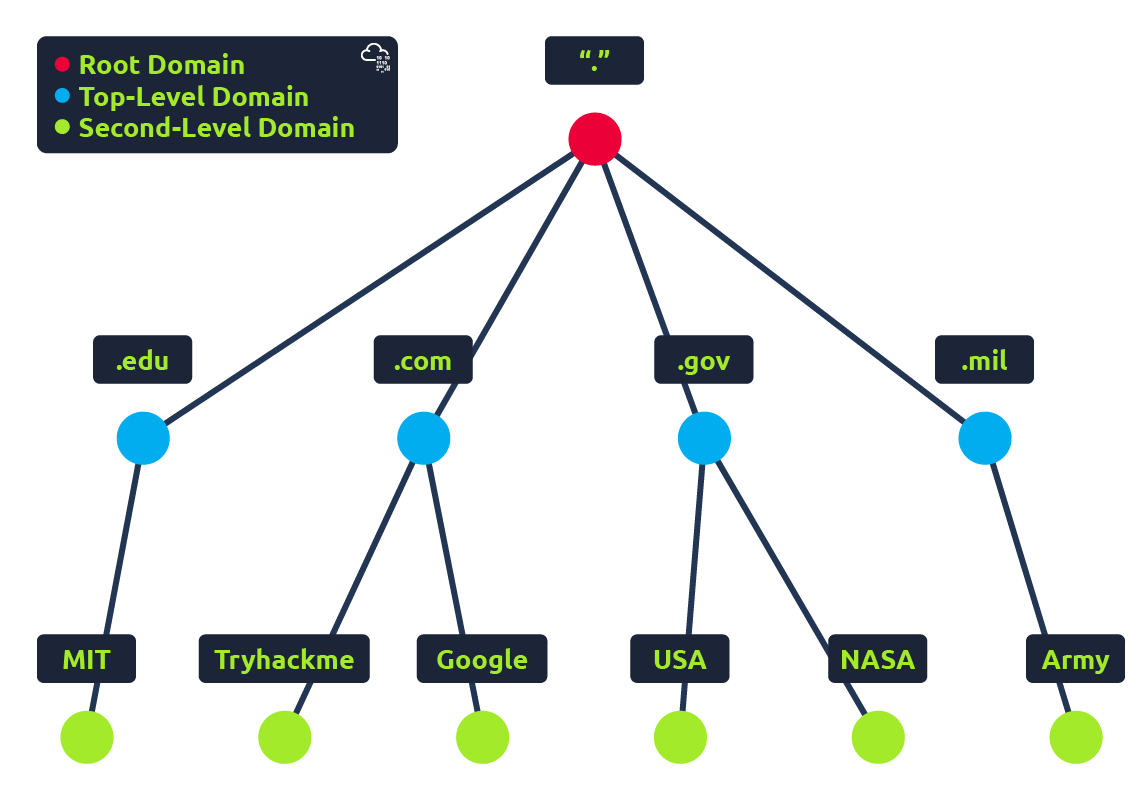
Take this website as an example:
admin.tryhackme.com
This is not just a one long address because it has a structure:
admin . tryhackme . com
It can be broken down into three sections:
- .com is the Top-Level Domain (TLD).
- tryhackme is the Second-Level Domain.
- admin is the Subdomain.
When registering a domain name, the second-level domain and its subdomain is limited to 63 characters + the TLD and can only use a-z 0-9 and hyphens (cannot start or end with hyphens or have consecutive hyphens).
I also learned there are different kinds of TLDs.
Some are gTLD(Generic Top Level Domain) depending on its purpose, such as:
.comfor commercial purposes.orgfor an organization.edufor education.govfor government
Others, ccTLD(Country Code Top Level Domain), represent countries, like:
.phfor Philippines.jpfor Japan.ukfor United Kingdom
Here's a full list of over 2000 TLDs.
Websites can be created as many subdomains as they need. That's why it's common to see addresses like:
mail.google.comdocs.google.comdrive.google.com
They're all different services under the same domain.
DNS Records
At first, I assumed DNS only existed to help people find websites.
It turns out that's only part of its job.
DNS stores different kinds of information called DNS Records, and each record has a different purpose.
Here are the ones I encountered today.
A Record
The A Record maps a domain name to an IPv4 address.
For example:
tryhackme.com
→ 104.26.10.229
Whenever someone visits a website using IPv4, this is usually the record being used.
AAAA Record
The AAAA Record does the same thing as an A Record, except it points to an IPv6 address instead.
Since IPv6 was introduced to solve the shortage of IPv4 addresses, websites often have both records available.
CNAME Record
This one was interesting.
Instead of pointing to an IP address, a CNAME Record points to another domain name.
For example:
store.tryhackme.com
→ shops.shopify.com
DNS then performs another lookup to find the IP address of that second domain.
I like thinking of it as a nickname.
Rather than telling someone exactly where a place is, you first tell them to ask another person who knows the address.
MX Record
The MX (Mail Exchange) Record tells the Internet where emails for a domain should be delivered.
For example:
hello@example.com
When someone sends an email to that address, the sender's email provider first checks the domain's MX Record to find out which mail server should receive it.
I hadn't realized DNS was involved in email too.
TXT Record
The TXT Record doesn't point anywhere. It simply stores text.
That text can be used for many different purposes, such as verifying ownership of a domain or helping email providers determine whether an email is legitimate.
It's a simple record, but apparently it's incredibly useful behind the scenes.
So What Actually Happens When We Visit a Website?
I always imagined my computer somehow "already knew" where Google was.
It doesn't. Instead, it follows a series of steps.
First, my computer checks whether it already remembers the answer in its DNS cache.
If it doesn't, it asks a Recursive DNS Server, which is usually provided by my Internet Service Provider.
If that server also doesn't know the answer, it begins searching through the Internet's DNS hierarchy.
It first asks the Root DNS Server, which points it toward the correct Top-Level Domain (TLD) Server, such as the one responsible for .com.
The TLD Server then points it to the website's Authoritative DNS Server, which stores the official DNS records for that domain.
Finally, the IP address is returned all the way back to my computer, and only then can my browser connect to the website.
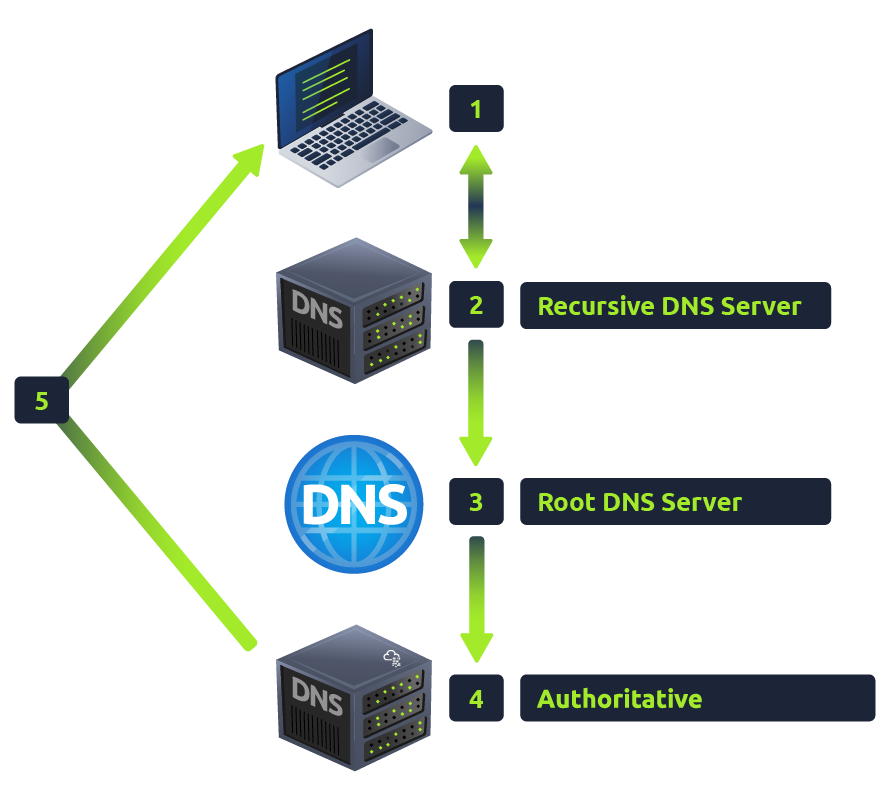
Reading those steps made me realize that DNS isn't just one server.
It's actually an entire system of servers working together to answer one simple question:
"Where is this website?"
Conclusion
I can now understand that DNS is one of the reasons the Internet is so easy to use because without DNS, every website would have to be accessed using an IP address instead of a name.
Something as simple as typing youtube.com or google.com actually starts a chain of events involving caches, recursive servers, root servers, TLD servers, and authoritative servers before the webpage even begins loading.
Next Rabbit Hole
Now that I know how my computer finds a website, another question came to mind.
Once the IP address is found, how does my browser actually communicate with the web server?
That sounds like the perfect time to learn about HTTP.
See you in the next learning journal. 👋
Reference
- TryHackMe — DNS in Detail